
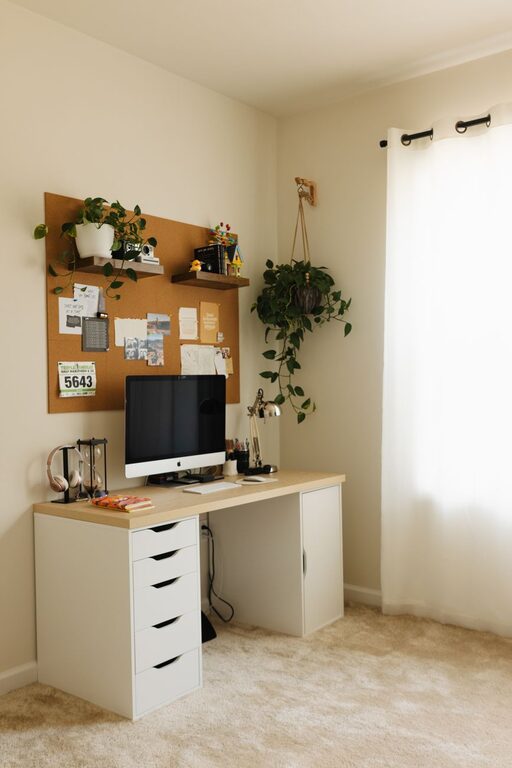
Creating a relaxing home workspace is essential for staying productive and motivated throughout your workday. When your workspace feels comfortable and organized, it’s easier to focus, reduce stress, and accomplish your tasks efficiently. Whether you work remotely full-time, occasionally bring work home, or manage personal projects, these tips will help you design a space that encourages calm and productivity.
Why a Relaxing Workspace Matters
Before diving into the tips, it’s helpful to understand why having a relaxing workspace makes a difference. A cluttered or uncomfortable environment can cause distractions, increase stress, and lower your overall work performance. On the other hand, a space that feels peaceful and inviting promotes clear thinking, creativity, and efficient task management.
1. Choose the Right Location
One of the first steps in creating a relaxing home workspace is selecting the best location. Ideally, look for a quiet corner or room that is separate from noisy or high-traffic areas.
– Natural light: Opt for a spot near a window if possible. Natural light boosts mood and energy levels.
– Ventilation: Good airflow keeps the space feeling fresh and prevents stuffiness.
– Privacy: A location where you can focus without interruptions is beneficial.
If space is limited, even a small nook or a section of a room can be adapted into a productive zone.
2. Invest in Comfortable Furniture
Your furniture choice directly impacts your comfort and productivity throughout the day.
– Ergonomic chair: A supportive, adjustable chair reduces strain on your back and promotes better posture.
– Desk: Choose a desk at the right height with enough surface area for your computer, notes, and tools.
– Optional additions: Consider a standing desk converter or a cushioned floor mat to alternate between sitting and standing.
Comfortable furniture helps prevent fatigue and physical aches, which allows you to stay focused longer.
3. Organize and Declutter Your Space
A tidy workspace has a calming effect and minimizes distractions.
– Keep only essentials: Store away items you don’t need during work hours.
– Use organizers: Drawer dividers, trays, and file holders keep papers and supplies neat.
– Regular cleanups: Schedule weekly or daily tidying sessions, even if brief.
By creating a clean environment, you reduce visual clutter and make it easier to find what you need.
4. Personalize Without Overcrowding
Adding personal touches to your workspace can make it feel more inviting and boost your mood.
– Decor: Include photos, artwork, or plants that inspire you.
– Color scheme: Soft, neutral colors tend to be calming, but small pops of your favorite colors can energize the space.
– Avoid too much: Avoid overcrowding your workspace with too many items to keep it feeling open and relaxed.
A balance between personalization and simplicity is key.
5. Minimize Noise Distractions
Background noise can impact your concentration and increase stress.
– Use noise-cancelling headphones: These are helpful if complete silence isn’t possible.
– Add soft background sounds: Gentle music or white noise machines can mask distracting noises.
– Soundproofing options: Rugs, curtains, and wall panels absorb sound and improve acoustics.
Creating a quiet or controlled sound environment supports better focus.
6. Use Good Lighting
Proper lighting reduces eye strain and creates an inviting atmosphere.
– Natural light: Make the most of daylight, but avoid glare on screens.
– Task lighting: A desk lamp with adjustable brightness helps when working in the evening or on focused tasks.
– Ambient lighting: Gentle light sources reduce harsh contrasts in the room.
Experimenting with different types of light can help you find what’s most comfortable.
7. Incorporate Relaxation Aids
Adding elements that encourage brief breaks and relaxation can boost creativity and energy.
– Plants: Indoor plants improve air quality and have calming effects.
– Scent: Mild aromas from essential oils or candles can reduce stress.
– Comfort items: A soft blanket or pillow can make your space cozier during breaks.
Remember, short relaxation moments improve long-term productivity.
8. Keep Technology Organized
Technology is essential but can become overwhelming if messy or disorganized.
– Cable management: Use clips, ties, or sleeves to keep cords neat.
– Equipment layout: Place monitors, keyboards, and other devices ergonomically for ease of use.
– Digital organization: Keep desktop files and digital tools streamlined and backed up.
A well-organized tech setup reduces frustration and downtime.
9. Establish Clear Boundaries
Working from home can blur the line between work and personal life.
– Set work hours: Establish and stick to specific times for working in your space.
– Communicate with household members: Make sure they understand when you need focused, uninterrupted time.
– Close the door or use a room divider: Physical separation helps maintain boundaries.
Clear boundaries contribute to a relaxed mindset and prevent burnout.
10. Regularly Refresh Your Workspace
Over time, your needs and preferences evolve, so it’s helpful to revisit your setup.
– Rearrange furniture: Change your layout for a fresh perspective.
– Update decor: Swap out items that no longer inspire or comfort you.
– Add new tools: Upgrade furniture, technology, or accessories as needed.
Keeping your workspace inviting encourages ongoing satisfaction and productivity.
—
Final Thoughts
Creating a relaxing home workspace takes a little effort, but the benefits are significant. By focusing on comfort, organization, personalization, and minimizing distractions, you set yourself up for a more focused, creative, and productive day. Take these tips step by step and tailor your workspace to fit your unique needs and preferences. You’ll be amazed at how much a calming environment can improve your work-from-home experience.